
Build Log: Shipping a Meta App
Meta disabled test user creation. Here's how to get testers onto your app anyway.
Meta has removed the ability to create new test users, but App Review still needs an account that can exercise your flow. Here is the difference between a test user and a Tester, and the two different places an invite shows up depending on whether the person has a developer account.
Meta's documentation for adding test users is still complete, still well-written, and still describes a button that does not work. That is the whole problem with building on this platform right now, and it is why I am starting this series.
I am building a Meta app for a client. Marketing features at the core, which means Pages, permissions, and eventually App Review. Yesterday I lost most of a morning to what should have been a five-minute task: getting a second person onto the app so we could test the login flow. This is what I learned.
TL;DR
- Meta has removed the ability to create new test users. The banner says "temporarily." Developers have been reporting it since December 2024.
- App Review does not need test users. It needs an account that can complete your flow. A real account with the Tester role does that.
- Adding a Tester takes one click. Getting the invite accepted is where people lose hours.
- Where the invite appears depends entirely on whether the invitee has registered as a Meta developer. Two different URLs, and the docs put them on two different pages.
- Registered developer:
developers.facebook.com/settings/developer/requests/ - Everyone else:
facebook.com/settings/?tab=applications, then scroll to the Requests block near the bottom.
Why can't I create test users anymore?
Open the test users documentation and the first thing on the page is a notice: "We are temporarily removing the ability for apps to create new test users." Accounts you already have keep working. Accounts created for assessment purposes are unaffected. New ones are simply not available.
Directly below that notice, the page goes on to explain how to create them. Four at a time from the Roles panel. Ten per app maximum. Bulk creation through the Application Accounts and Test Account endpoints on the Graph API. All of it accurate, none of it usable.
So you read the instructions, follow them, hit a dead control, and conclude you have misconfigured something. You have not. The developer community threads go back to December 2024, with follow-ups through 2025 describing the feature as broken since early that year, and other threads saying the same thing. There is no official response in any of them and no stated timeline.
If your app was created after early 2025, you have zero test users and no supported way to make one.
Testers, test users, consumer testers — which one do you need?
Meta uses three similar names for three different things, and picking the wrong word is why searching the docs fails you.
| What it is | Who it is | Needs a developer account? | Can you still get one? |
|---|---|---|---|
| Administrator | A real person with full control, including roles and app deletion | Yes | Yes |
| Developer | A real person who needs dashboard and technical settings access | Yes | Yes |
| Tester | A real person who logs in and exercises the app in development mode | No | Yes |
| Analytics user | A real person with read-only access to insights | Yes | Yes |
| Consumer tester | The docs' name for a Tester who is not a registered developer | No | Yes |
| Test user | A simulated account generated by Meta | n/a | No |
The role you want is Tester. "Consumer tester" is not a separate role you assign; it is the term the documentation uses for a Tester who has never registered at developers.facebook.com. That naming split matters more than it should, because the acceptance instructions live in the consumer tester section. If you search for "tester role" you land on the page that tells you how to send the invite and not the page that tells your invitee how to accept it.
How do you add a Tester and actually get the invite accepted?
Sending it is the easy half.
- Open your app in the App Dashboard.
- Go to App Roles → Roles.
- Click Add People and choose Tester.
- Enter the person's Facebook profile or their developer account and send.
Now the fork. Tell the person exactly which of these two places to look, because they will not find the other one on their own.
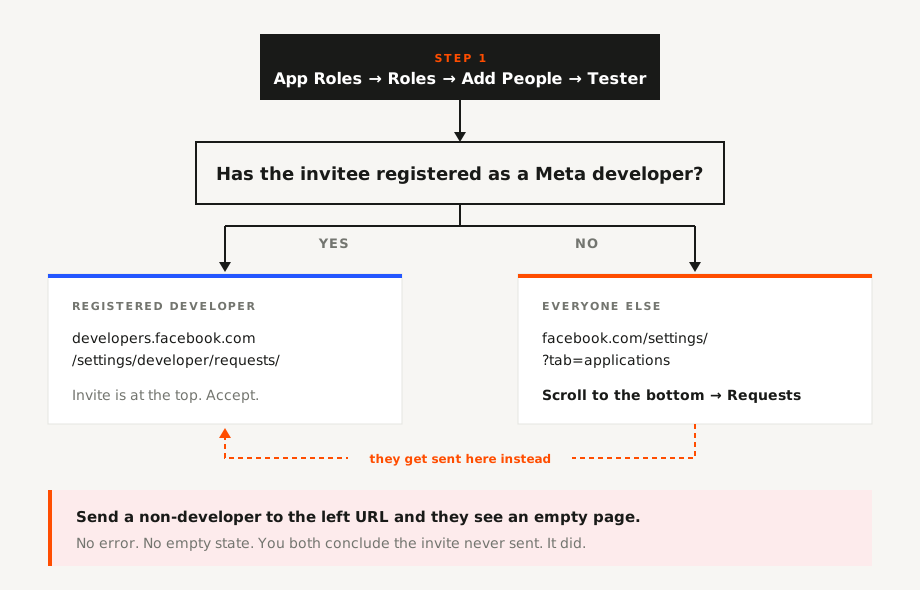
If they have registered as a Meta developer, they accept at https://developers.facebook.com/settings/developer/requests/. The pending invitation sits there with Accept and Decline next to it.
If they have not, that page shows them nothing at all. Not an error, not an empty state with an explanation. Nothing. They accept instead from their ordinary Facebook account: Settings & privacy → Settings → Apps and Websites, or go straight to https://facebook.com/settings/?tab=applications. Scroll to the bottom of that page. There is a Requests section there with the invite in it.
That scroll is the part that costs people the morning. The Requests block is below the list of apps the person has already connected, which for anyone with a normal Facebook history is long.
The failure mode is predictable now that you can see it: you send an invite to a client, tell them to check their developer requests, they open a page built for developers, see an empty list, and report back that nothing arrived. You resend. They check again. Both of you conclude the invite system is broken. It is not broken; you are looking at the wrong surface for the account type.
Edge cases and honest caveats
Existing test users still work. If your app predates the change, whatever you had is still there. This only bites new apps.
Check which account they are logged into. Multiple Facebook sessions in one browser is the single most common false negative. The invite goes to a specific account, and business profiles are not the same account.
Resend rather than debug. Role invites can go stale or be superseded. If it genuinely is not showing up on the right surface for the right account, revoke and send again before you go looking for a platform bug.
Tester role is development mode only. It lets someone use your app before it is live. It does not advance App Review, and it does not grant advanced permissions your app has not been approved for.
If the app is tied to a Business portfolio, roles may also need handling in Business Manager under people and assets. I have not had to do this on the current build, so verify against your own setup rather than taking my word for it.
Do not make the client an Administrator to get past this. It is the fastest fix and the worst one. Admin can delete the app.
Frequently asked questions
Does App Review require test users? No. It requires credentials for an account that can complete the flow you are submitting. A real account with the Tester role does that. One responder in the community thread put it precisely: it does not require app test users, it requires users with the tester role.
Can I still create test users through the Graph API? The endpoints are documented, but the removal covers creation of new test users, not just the Dashboard control. Do not build tooling that depends on it.
My tester says the requests page is empty. What went wrong?
Almost certainly nothing. They are not a registered developer. Send them to facebook.com/settings/?tab=applications and tell them to scroll to the Requests block.
Is Tester enough, or do they need Developer? Tester is enough for testing. Developer adds dashboard and settings access that most testers should not have.
Do testers have to accept before I submit for review? Yes. A pending invitation grants nothing.
This is episode 1 of Build Log, where I write up the problems I hit shipping a Meta app for a client and what actually fixed them. The documentation is not wrong so much as it is sorted wrong, and that costs working days. If that sounds useful, the next one lands in your inbox.